
You press the button. Nothing happens. Or worse — something happens, but the result barely resembles coffee. If your coffee machine is not working the way it should, you’re not alone. These machines are used multiple times a day, every day, and even the best models eventually act up.
The good news? Most issues are surprisingly easy to fix at home. This guide walks you through the most common coffee machine problems, explains why they happen, and gives you clear, actionable solutions — so you can get back to your morning cup without the stress.
Why Troubleshooting Your Coffee Maker Matters
Before calling a repair service or buying a new machine, it’s worth spending 10 minutes diagnosing the problem yourself. The majority of coffee maker troubleshooting cases come down to one of a few root causes: mineral buildup, blockages, incorrect settings, or worn-out components that are cheap and easy to replace.
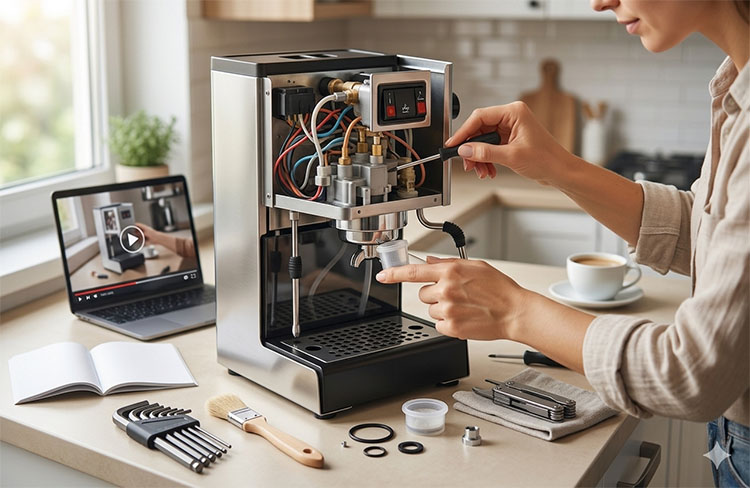
Understanding your machine also helps you maintain it better — which means fewer problems down the road and a noticeably better-tasting cup.
Problem 1: Coffee Machine Not Turning On
You press the power button and nothing happens. No lights, no sounds, no response. | This is usually an electrical issue — not a mechanical one. |
How to fix it:
- Check the power outlet. Plug another device into the same socket to confirm it’s live. This sounds obvious, but it’s the cause more often than you’d think.
- Inspect the power cord. Look for visible damage — fraying, kinks, or bent prongs. A damaged cord is a safety risk and needs replacing before use.
- Reset the machine. Many modern coffee makers have a thermal cutoff switch that trips when the machine overheats. Unplug it, wait 10–15 minutes, then plug it back in.
- Check the water reservoir. Some machines won’t power on if the tank isn’t properly seated or is empty.
- Consult the manual for a factory reset. Most machines have a reset sequence (often holding two buttons simultaneously for 5 seconds).
When to escalate
If none of the above work and the machine is under warranty, contact the manufacturer. If it’s not, a local appliance repair shop can usually diagnose electrical faults affordably.
Problem 2: Coffee Machine Turns On But Doesn’t Brew
The machine powers up, lights come on, but no coffee comes out — or only a trickle flows. | This is one of the most reported issues in coffee maker troubleshooting, and it's almost always caused by a clog or a pump problem. |
How to fix it:
- Run a descaling cycle. Mineral deposits (limescale) are the #1 cause of blockages in coffee machines, especially in areas with hard water. Use a dedicated descaling solution or a mix of equal parts white vinegar and water. Run 2–3 cycles, then flush with clean water.
- Clean the brew head or portafilter. For espresso machines, remove the portafilter and soak it in warm water with a small amount of espresso machine cleaner. Use a brush to clear any coffee residue from the group head.
- Unclog the needle (for pod machines). Keurig and similar single-serve machines have a small needle that punctures pods. This needle clogs with coffee grounds over time. Use the cleaning tool that came with your machine, or carefully clear it with a straightened paperclip.
- Check the water pump. If you hear the pump running but no water flows, the pump may be air-locked. Try filling the reservoir, placing it back firmly, and running the machine several times.
Pro tip!
If you live in a hard water area, descale your machine every 1–2 months. This single habit prevents the majority of “coffee machine not working” calls we see.
Problem 3: Coffee Tastes Weak or Watery
Your coffee is pale, thin, and lacks flavor — more like coffee-colored water than an actual brew. | Weak coffee is a brewing issue, not a machine malfunction. It's almost always caused by grind size, coffee quantity, or water temperature. |
How to fix it:
- Use more coffee. The standard ratio is 1–2 tablespoons of ground coffee per 6 oz of water. If you’ve been using less, start there.
- Check your grind. Coffee that’s ground too coarsely extracts less flavor. If you grind your own beans, move to a finer setting. If using pre-ground coffee, switch to a blend labeled “espresso” or “fine grind.”
- Adjust brew strength settings. Many drip machines and pod brewers have a “bold” or “strong” setting that reduces flow rate, giving water more contact time with the grounds.
- Descale your machine. Limescale can reduce water temperature, which directly weakens extraction. Even if the machine seems to be working, descaling may restore flavor intensity.
- Check your coffee’s freshness. Stale beans produce weak, flat coffee regardless of machine settings. Coffee is best used within 2–4 weeks of the roast date.
Problem 4: Coffee Machine Leaking Water
Water pools under the machine, drips from the brew head, or seeps from connections during brewing. | Leaks typically come from worn seals, loose connections, or an overfilled reservoir. |
How to fix it:
- Identify where the leak is coming from. Place a paper towel under the machine and run a brew cycle. Where the towel gets wet first tells you the source.
- Check the water reservoir seal. Remove the tank, inspect the rubber gasket at the base, and reseat it firmly. If the gasket is cracked or deformed, it needs replacing (usually a $5–$10 part).
- Inspect the drip tray. If the drip tray is overflowing, simply emptying and reseating it will stop the apparent “leak.”
- Tighten the portafilter (espresso machines). If coffee or water leaks around the group head, the portafilter may not be locked in correctly, or the group head gasket may need replacing.
- Don’t overfill. Every reservoir has a MAX line. Exceeding it causes overflow during heating.
Problem 5: Coffee Machine Making Unusual Noises
Symptoms
Loud grinding, rattling, banging, or high-pitched squealing during operation.
Why it happens
Coffee machines are not silent, but certain sounds indicate something is wrong.
How to fix it:
Loud vibrating/rattling | Loose drip tray or reservoir | Reseat all removable parts firmly |
High-pitched whining | Air in the pump | Refill reservoir; run several short brew cycles |
Grinding noise (non-grinder machine) | Foreign object or limescale in pump | Descale; inspect for debris |
Banging or knocking | Blocked steam wand or pressure buildup | Clear blockage; run a steam purge cycle |
If a grinding machine suddenly sounds harsher than usual, check for small stones or over-roasted beans — these can damage burrs. | ||
Problem 6: Coffee Is Not Hot Enough
Coffee comes out lukewarm, even on the highest temperature setting. | Temperature issues are usually linked to limescale insulating the heating element, or to the machine's thermal carafe not being pre-warmed. |
How to fix it:
- Pre-warm your cup. Pour hot water into your mug 30 seconds before brewing. Cold ceramic pulls heat from your coffee almost instantly.
- Pre-warm the carafe. For drip machines, run a cycle with just water before brewing.
- Descale the machine. Limescale on the heating element acts as insulation, reducing the temperature of water that reaches your cup.
- Check temperature settings. Some machines have adjustable brew temperature in their settings menu. Consult your manual and increase it if possible.
- Inspect the heating element. If descaling doesn’t help, the heating element may be failing. This is a repair best left to a technician unless you’re comfortable with appliance repair.
Problem 7: Steam Wand Not Working (Espresso Machines)
Little to no steam comes out, or the steam is weak and inconsistent. | Milk residue dries inside the wand and blocks the tip — one of the most common espresso machine issues. |
How to fix it:
- Purge the wand immediately after each use. Run a short burst of steam to push out any milk inside the wand before it dries.
- Soak the wand tip. Remove the tip (it usually unscrews) and soak it in warm water for 20–30 minutes. Use a thin pin or toothpick to clear the holes.
- Run a full steam cycle. Once the tip is clean and replaced, run the wand for 30 seconds to clear any remaining residue inside the wand body.
- Use a steam wand cleaning brush. These are inexpensive and make maintenance much easier.
Preventive Maintenance: Avoiding Problems Before They Start
The best coffee maker troubleshooting is the kind you never have to do. Here’s a simple maintenance routine that keeps most machines problem-free:
|
|
|
|
When to Replace Instead of Repair
Not every coffee machine is worth fixing. Here’s a quick rule of thumb:
- Repair if the machine is less than 3 years old, under warranty, or the repair cost is less than 40% of a new machine’s price.
- Replace if the heating element has failed on a budget machine, the pump needs replacing on an older unit, or repair quotes exceed half the replacement cost.
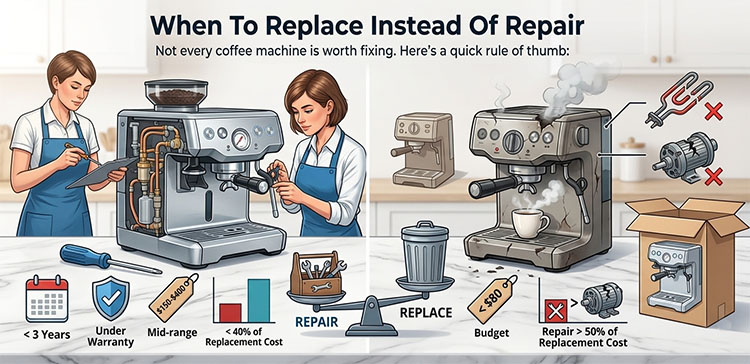
Mid-range machines ($150–$400) are generally worth repairing once. Budget machines under $80 are often more economical to replace. Premium machines ($500+) are almost always worth professional servicing.
Final Thoughts
A coffee machine not working properly is frustrating — but in most cases, it’s fixable. Whether it’s a simple descaling session, a clogged needle, or a loose gasket, the solutions are usually within reach of any home brewer willing to spend a few minutes diagnosing the issue.
Keep up with regular maintenance, pay attention to early warning signs (weak flavor, slow brewing, unusual noises), and you’ll extend the life of your machine significantly — while enjoying better coffee every day.
